Skip to content
Fitila Labs

Product

Fitila Agents

A framework and browser studio for building AI agents that plan scientific and engineering tasks, call simulation and analysis software, and record every step.

  • Liveframework, Studio and the solver services shown
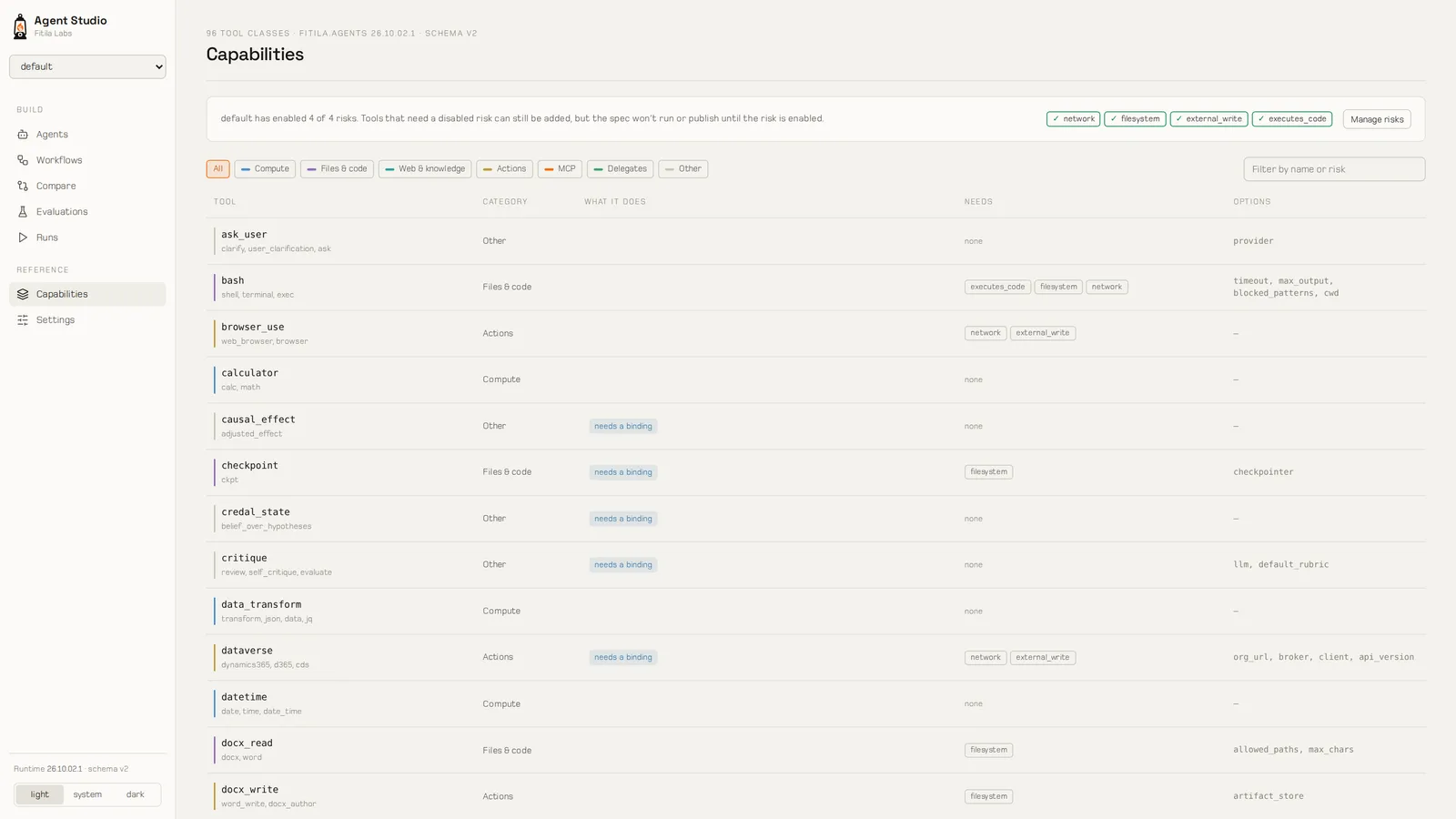
Agent Studio's capability list: every tool with its category and the risks it needs enabled
Screen: Agent Studio lists the 96 tools the installed runtime can build, each tagged with what it can reach.

Why a scientific agent framework

Most agent frameworks run one loop: the model reasons, calls a tool and repeats until it decides it is finished. That works for routine tasks. Deciding whether a fault is sealing, meshing a well for a simulator, or choosing between competing explanations of a dataset also requires plans that follow established procedures, tools that compute results, and answers that state their uncertainty.

QuestionA general agent loopFitila Agents
Who decides what the evidence meansThe model, in proseThe evidential core, using Dempster–Shafer combination. The model selects which evidence to collect but does not assign belief.
When it stopsWhen the model feels doneBy rule: a credible verdict, high conflict, an incomplete frame, a round limit or a spent budget
What a number isWhatever the model wroteWhat the solver returned, with the call and its arguments in the trace

The rule-based stopping above is how the evidential planners work; the general strategies, ReAct among them, are also available.

Planning strategies

A planner determines how an agent works through a task: one step at a time, a full plan up front, a fixed procedure, or a set of competing hypotheses. Fitila Agents includes fifteen planning strategies. The six below are designed for scientific and engineering work.

Hypothesis and evidence

  • Live
hypothesis_evidence

Frames a question as competing hypotheses, each with a way to confirm or refute it, plus one that absorbs evidence fitting none. The model chooses what to gather; an evidential core turns each observation into belief by Dempster–Shafer combination. Dependent sources count once, conflict between sources is reported, and evidence used to find a hypothesis is not used to confirm it. The result is a verdict (credible, leading, inconclusive, high conflict or frame incomplete), with belief and plausibility for each hypothesis and the next measurement ranked by how much uncertainty it would remove per unit of cost.

Model discovery

  • Live
model_discovery

Treats rival model structures as hypotheses, with a null structure always among them. Fits every candidate in one call, ranks them by Akaike weight, audits whether each one's parameters can be pinned down at all, and scores them on rows held out from fitting. When the leaders can't be separated, it reports the ensemble and names them all.

Hierarchical task network

  • Live
htn

Runs an established procedure. The procedure is a task library: compound tasks expand until every step is a primitive bound to a tool. A task outside the library is decomposed by the model, but only into the library's own primitives. Ships with domains for oil-and-gas asset evaluation and for drug discovery.

Probabilistic graphical models

  • Live
pgm

For questions with calibrated conditional probabilities and a closed set of variables: Bayesian networks, Markov networks, dynamic Bayesian networks and influence diagrams. On an influence diagram, the best decisions become the plan. Ships with specifications for drug-target validity, a drug-discovery funnel and a subsurface reservoir.

Belief state

  • Live
belief_state

Tracks a belief over a hidden state as a partially observable Markov decision process, and chooses actions by Q-MDP when a reward is declared. For sequential decisions where the state is never seen directly.

Reinforcement learning

  • Live
reinforcement_learning

Runs a policy trained offline on a declared environment, one action at a time. Ships with environments for subsurface operations and energy trading.

And the general strategies: ReAct, ReWOO, plan-and-execute, tree of thought, dynamic replanning, code actions and collaborative planning across remote agents.
Evidential reasoning

For evidence questions, the evidential core reports six quantities and a verdict for each hypothesis. They are recomputed from an append-only ledger each time they are read.

  • The model does not assign belief. It records observations (a test result, an effect size, a graded claim from a paper), and the core computes their effect.
  • Dependent evidence counts once. Three reports of the same study are treated as one study.
  • Discovery data is held out. Data used to find a hypothesis is excluded from the verdict that tests it.
  • Inconclusive results are reported. So are high conflict between sources and an incomplete set of hypotheses. The core does not force an answer the evidence does not support.
Belief
How much the evidence supports the hypothesis directly
Plausibility
How much of the evidence does not rule it out
Doubt
How much the evidence counts against it
Width
Plausibility minus belief, the remaining uncertainty
Ignorance
Mass left on “any of these”: what nothing has spoken to yet
Conflict
How much the sources disagree

Each verdict traces back to a hash-chained ledger of what was recorded, when and from which source, and the core can list the records it depends on.

Scientific tools

Agents call our numerical, biology and meshing libraries over the Model Context Protocol (MCP), so the numbers they report come from those libraries, not from the language model.

Numerical methods

  • Live

Linear algebra, optimization, ODE and DAE solvers, statistics, signals, control, decision analysis, surrogates and uncertainty quantification. Twelve MCP services, one per library, with 107 tools between them, checked against reference results captured from established toolchains.

Meshing from a description

  • Live

CAD to mesh from a declarative, unit-aware model language an agent can write. Validates and lints a model, estimates it, meshes it and exports in eleven solver formats. Sixteen tools, plus resources and prompts that teach an agent the language.

Quantitative and systems biology

  • Live

Reaction networks, PK/PD and PBPK, dose–response with censored data handled correctly, QSAR with a mandatory applicability domain, and identifiability. Thirty-nine tools, and prompts that route an agent to the right one.

Physical-systems modeling

  • In build

Acausal, multi-domain physical modeling compiled to differentiable equations. Five tools are declared for agents; the MCP endpoint is being finished.

Your own services can be added the same way. Any MCP server, over stdio or HTTP, becomes a set of tools an agent can call, with each call and its result recorded. Agents can also be served over MCP and A2A.

Agent Studio

Agent Studio is a browser application for building, running, evaluating and publishing agents. Its options are generated from the installed runtime, so every configuration it offers can run.

  • Live
  1. 01

    Build

    Lay out an agent on a canvas: its model, planner, tools, MCP servers, specialists and the blocks that govern it. The YAML stays beside it, comments and all.

  2. 02

    Run

    Ask it something in the Playground and watch each tool call and its result arrive, with timing and cost. Runs survive a reload.

  3. 03

    Evaluate

    Hold an agent to a suite of cases, judged by exact match, containment, similarity or a model, and compare a draft with the version that's live.

  4. 04

    Publish

    Freeze a version, stamped with the schema and the runtime it was built against. Any later runtime builds it; an older one refuses it.

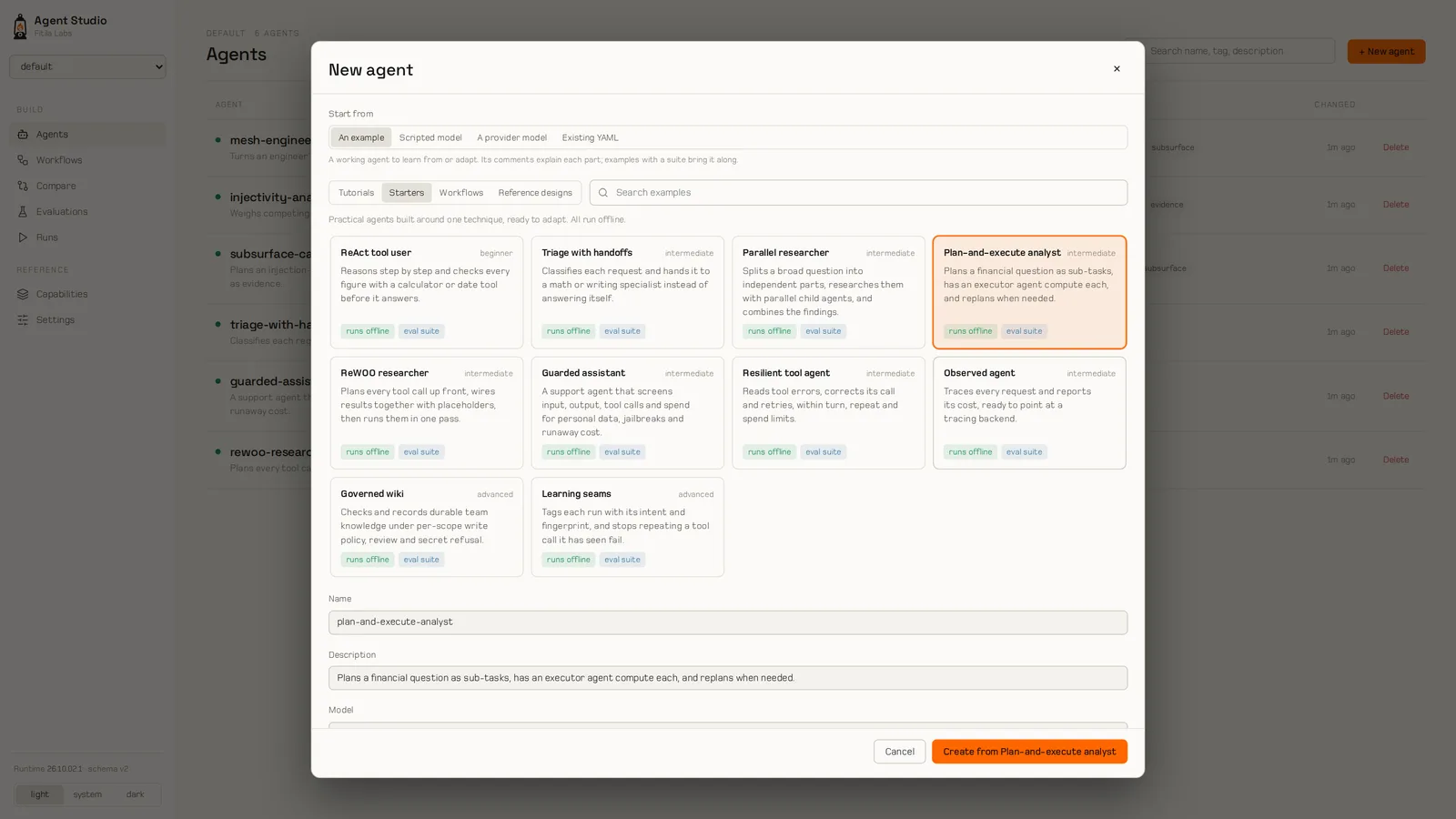
Agent Studio's gallery of tutorials, starters and reference designs
Screen: Agent Studio's gallery, where every example says up front what it needs to run.

Start from an example: twelve tutorials, ten starters adapted from our own agents, and full-size reference designs, each saying up front what it needs to run.

Workflows

Some processes have known stages and sign-offs, such as a drug-discovery program. A workflow defines the steps, routes and approvals, and Agent Studio displays it as it runs and records what each step did.

  • In buildships with the next Agent Studio release

Example: from target to chemical matter

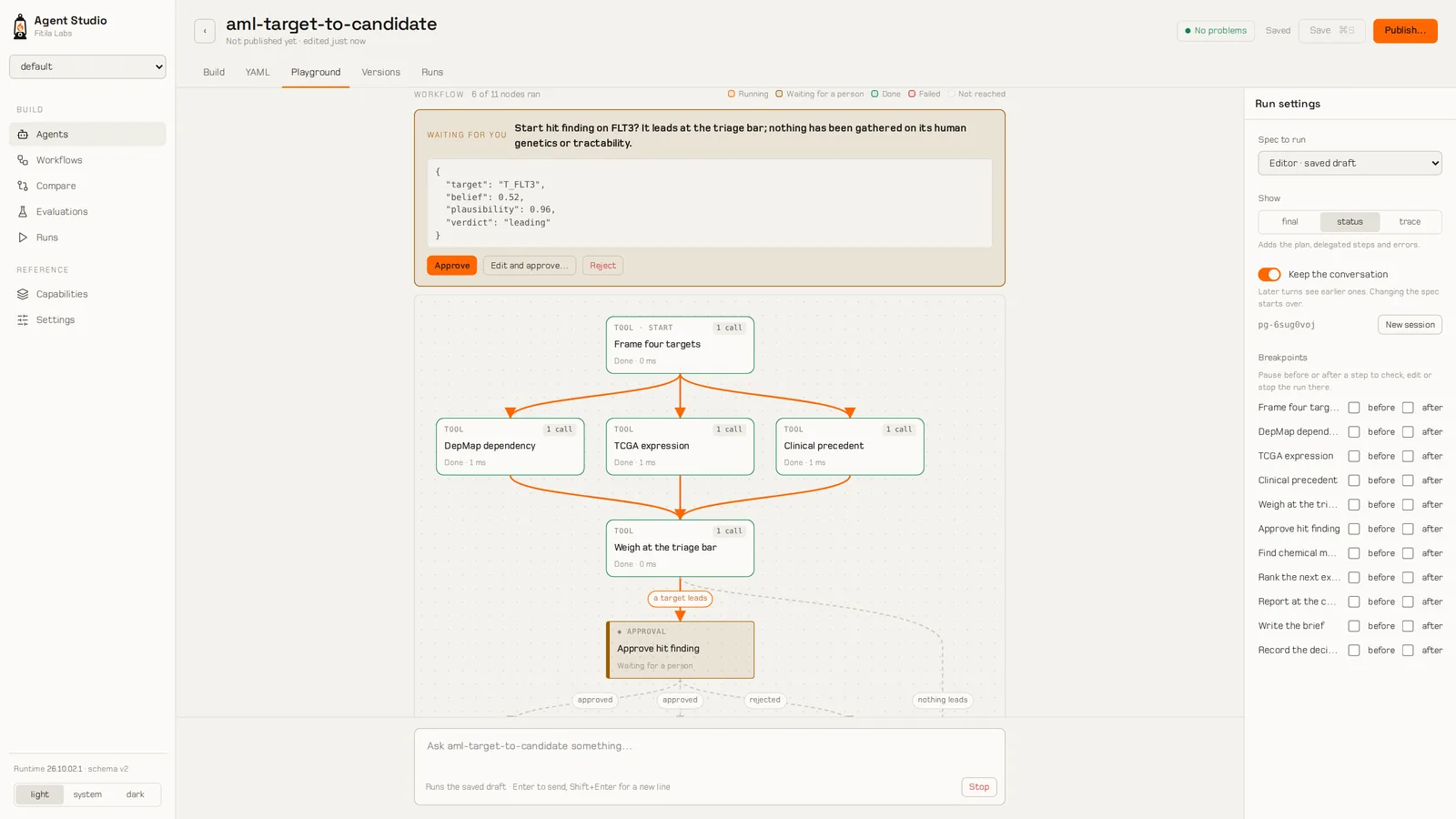
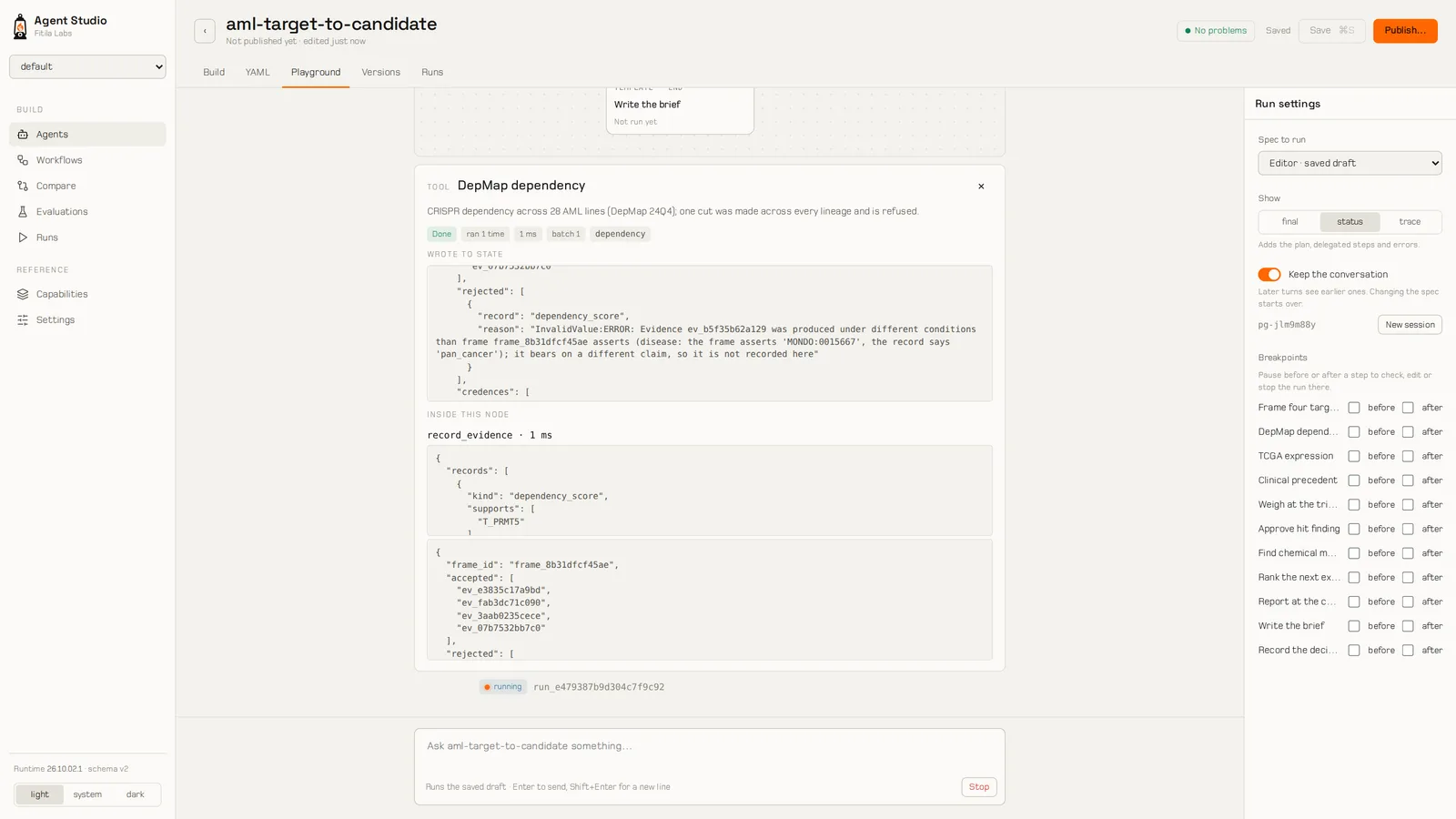
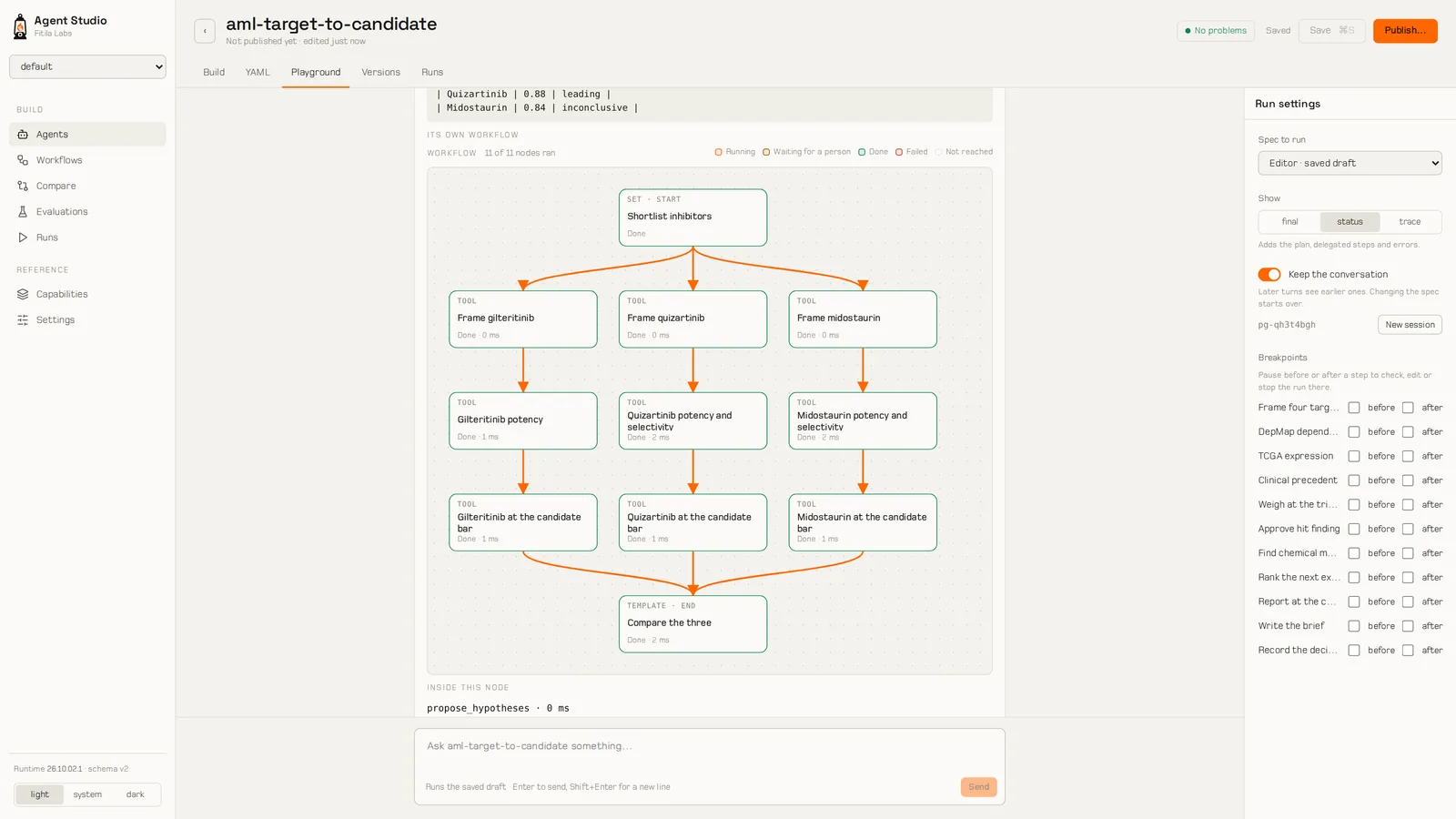
Four candidate targets for acute myeloid leukemia go in. DepMap dependency, TCGA expression and clinical precedent are recorded in parallel, and the evidential core weighs them. Five of the fourteen records are refused, because they are about another disease or every lineage at once, and the step says why. FLT3 leads, with belief 0.52 and plausibility 0.96, so the run stops and asks a person to approve hit finding. Once approved, a chemistry step runs a workflow of its own: three FLT3 inhibitors, each weighed on its measured ChEMBL potency. Quizartinib, the only one with a measured selectivity, reaches 0.88 at the candidate bar. The brief says what is still missing: human genetics and tractability for the target, and a KIT measurement for gilteritinib.

No model is asked at any step; every number is computed from DepMap, TCGA and ChEMBL records. All three compounds are approved drugs: the example shows the method, not a discovery, and it weighs potency and selectivity only.

Agent Studio paused at an approval gate in the acute myeloid leukemia workflow
Screen: the run waits for a person to approve hit finding, with the evidence as its proposal.

A gate where a person decides

The run waits at the approval with the evidence as its proposal. Approve, reject, or edit the values and approve.

Agent Studio showing what one workflow step wrote, including refused evidence

What every step wrote

Open a step to see what it put into the state, including the evidence the core refused and its reason.

Agent Studio drawing a nested workflow inside a step

A workflow inside a workflow

An agent step can run a workflow of its own; Studio draws it inside the step.

Pause before or after any step to check or edit the state. A stopped run resumes from where it was. An evaluation answers every approval with a set verdict, so a gated process can still be tested unattended.

Example: meshing from a description

Mesh generation often takes the first week of a simulation study. In TerraNavitas Subsurface, an engineer describes the model in plain language; an agent writes it in the mesher's model language, checks each version with the mesher, and reports anything it could not build.

  • Livein the Subsurface workbench
  • In buildthe production mesher connection
CaseWhat the agent builtChecked against
Saline-aquifer section, 2DValid on the mesher's first check; 21,951 triangles, median quality 0.990Pressure within 2.7% of the Carslaw–Jaeger closed form
Cased, cemented, perforated well, 3D193,067 tetrahedra, under the 200,000 asked forWithin 3% of the bonded-cylinder (Lamé) solution
Faulted CO₂ storage block, 4 × 4 × 1.5 km573,656 tetrahedra; a 30-day injection runInjected CO₂ accounted for to 0.01%

We gave the agent's saline-aquifer model to a Fitila agent with the mesher over MCP. The mesher flagged one thing: the cells around the injector grew 1.6 times per cell, too fast for a clean transition. The agent widened the refinement, the second check came back clean, and the mesh it reported (21,569 triangles, median quality 0.990) is the one the mesher measured.

Controls

Agents that act on instruments, data or budgets need limits. Fitila Agents treats each tool's access as a permission and requires human approval for actions that cannot be undone.

  • Approvals.

    A run pauses until a person approves, rejects or edits what the agent is about to do. The run waits, even across a reload.

  • Budgets.

    Spend is capped per run, per turn and per person, with a cap per request.

  • Guardrails.

    Checks on input, output, tool calls and spend: prompt injection, personal data, tool safety.

  • Permissions by risk.

    Every tool is tagged with what it can reach (running code, the file system, the network, outside systems). A workspace enables each kind on purpose.

  • Fixed versions.

    A published agent is immutable, stamped with the schema and the runtime it was built against.

  • A record of every step.

    Each tool call, its arguments and its result, with timing and cost, kept with the run.

Where it is used

Subsurface and energy

Meshing agents in TerraNavitas Subsurface; an HTN domain for asset evaluation; planner environments for reservoirs and energy trading.

  • Live
  • In build

Drug discovery and biomedicine

Evidence packs for target validation, chemical matter, safety, clinical evidence and biomarkers; the biology library over MCP; an HTN domain for discovery.

  • Liveframework

Engineering analysis

Meshes from a description, solvers for optimization, ODEs, control and uncertainty, and checks against closed-form results.

  • Live

Quantitative research

An evidence pack for strategy research: backtests weighed as evidence, with staleness.

  • Liveframework

“Live (framework)” means the capability ships in Fitila Agents, not that a customer runs it in production. Evidence packs use framework-default calibration until practitioners review them.

planning strategies, including hierarchical task networks and hypothesis–evidence
15planning strategies, including hierarchical task networks and hypothesis–evidence
built-in tools, each tagged with what it can reach
96built-in tools, each tagged with what it can reach
numbers behind every verdict, from belief to conflict
6numbers behind every verdict, from belief to conflict
numerical-library services an agent can call over MCP
12numerical-library services an agent can call over MCP
model providers, with fallback chains
5model providers, with fallback chains

Frequently asked questions

Is this a chatbot?

No. It's a framework for agents that do analysis: they plan, call solvers and data services, weigh evidence and report, with a trace of every step. You talk to them, but the point is the work they show.

Which models does it run on?

Anthropic, OpenAI, Azure OpenAI, Google and self-hosted models through Ollama, with fallback chains when a provider fails. The planners and the evidential core don't depend on the model you choose.

Does the model decide what's true?

Not in the evidential planners. The model chooses what to gather; the evidential core decides what it means and says how sure it is.

Can it use our own tools and data?

Yes. Any MCP server becomes a set of tools an agent can call, and agents can call other agents over A2A. Tools that need your authenticated systems are supplied by your deployment, never stored in the agent.

Can I see what an agent did?

Every call, its arguments, its result, its timing and its cost, in Agent Studio and in the run's record.

What stops an agent from doing something it shouldn't?

Tools are permissioned by what they can reach, spend is capped, and anything marked for approval waits for a person.

Is it open source?

No. Fitila Agents and Agent Studio are proprietary software from Fitila Labs. Contact us about access and licensing.

Request a walkthrough

We can show an agent working on a problem from your field, with the full record of each step.

Screens and figures come from showcase runs: the agents' moves are scripted, and every result shown is computed. Pressure data in the evidence run are example values. Fitila Agents and Agent Studio are built by Fitila Labs.

Book a walkthrough